
Fancy Font Generator
Turn plain text into eye-catching fancy fonts in seconds with our free Fancy Text Generator, just type, pick a style, and copy paste anywhere online.
Fancy Font Styles
Favourites
No favourites yet — tap ♡ on any style to pin it here.
Fancy Text Generator
Good digital communication needs more than plain words, it needs visual appeal. That is the whole idea behind a fancy fonts generator: turn ordinary letters into something people notice. From captions with real personality to quick instant results for engaging content, this text generator works as a full fancy text maker for bios, messages, and anything meant to stand out online.
It gives users a way to express creativity with genuine creative freedom, offering fancy text styles that highlight words, build eye-catching text, and keep a stylish text look with consistent appearance across platforms. Every style stays universally supported, so normal letters turn into new styles with one click Copy, ready to paste anywhere.
This tool is part of our wider collection of style-based font generators, all free and copy-paste ready. If you want a deeper collection focused on just one look, our dedicated Bold Text Generator, Italic Font Generator, Cursive Text Generator, Gothic Font Generator, Big Text Generator, Wide Font Generator and Vaporwave Text Generator each cover hundreds of styles within that single category.
How To Use Our Fancy Text Generator
Using it takes almost no technical effort. This text fancy tool, or simply the fancy generator, turns plain input into stylish formats in seconds. Choosing a style works well even for beginners, and it fits right into daily messaging since it offers multiple styles and saves time.
Just enter text, any mix of A-Z, 0-9, and the tool pulls from styled Unicode sets made of real characters. Type into the input box and styles appear instantly, letting anyone pick a style on the app or site. Tap to copy any card or variant, get a quick confirmation, and the text lands on the clipboard, ready to paste it anywhere: Discord, Instagram, X/Twitter, TikTok, Slack, a README file, or a blog post. That is how the tool works in a few short steps.

Enter Your Text
It works best with short phrases. Turning plain text to fancy text starts with styled text for names and single words, or a longer block of paste content. To find your fonts, type into the text box at the top of screen, then let fonts customize to taste.
Copy Your Fancy Text
Copying takes one click, with formatting intact every time. Save a favorite style, and the fancy text copy paste flow lets anyone copy and edit text right there. Click to copy opens a small editor to edit text, add more text, or swap fonts entirely. One must-know tip: use the same editor to change texts while it will keep font styles locked in. That is the whole Font Copy Paste feature, built for fast fancy font copy paste work.
Paste Your Favourite Fancy Text
Once copied, the text can paste anywhere online. The results hold up because users can copy full text in one move and paste text wherever it needs to go, backed by real Unicode compatibility.
Uses of Fancy Fonts
It fits forums, creative projects, and stylish names just as well as email signatures meant to highlight content. It stays versatile across multiple platforms, for professional purposes and personal purposes alike, covering Instagram bios, Facebook posts, YouTube titles, comments, Twitter/X, WhatsApp, and Telegram.
Gamers use it for game names on Fortnite, PUBG, Free Fire, Roblox, or for Minecraft signs and server names. Even emails benefit from a fancy line at the top, pairing a bold style headline with an italic style hook, then a body normal section in a plain readable style. Some prefer curly sets for Game IDs, giving a sharp bold look and better visibility in the lobby.
Others just need key phrases or a single fancy quote for an Email subject that coworkers will actually notice inside most mail clients. Mixing in a few symbols works well for Games, Ads, or any font generator tool post on LinkedIn, Twitter bios, and other social profiles, all built to grab attention on video description fields across YouTube and Snapchat, some of the biggest use cases around.

Forums
On forums, since native text formatting is often limited, this becomes a quick way to stylize usernames and highlight important content. Creative fonts stand out without hurting readability, keeping engaging discussions alive.
Education
In education, students and teachers use styled text in notes, assignments, and other study materials. Bold headings hold attention better and support retention, turning plain learning materials into something more interactive and visually stimulating.
Art & Design
For art and design work, fancy text fits neatly into posters, graphics, and digital artwork, or full presentations, acting as a small stylistic element that adds visually distinct text without touching real typography rules. It skips complex software entirely, which designers often appreciate for quick drafts.
Chatting
In everyday messaging apps, extra formatting options turn plain playful greetings into something with real decorative flair, useful in casual conversations on Messenger or anywhere else that calls for expressive communication.
Documents
Even office files like Word, Excel, and PDFs can use it to flag key information, both in professional documents and personal documents.
Stylish Name
A stylish name does a lot of work across social media profiles and gaming identities. Custom usernames built from customizable designs add real aesthetic appeal, giving a sense of personalization that drives engagement and helps with recognition online.
Email Signatures
Email signatures are another strong fit. Titles, taglines, and a touch of decorative text can turn plain professional correspondence into something with a memorable touch, showing real attention to detail and lasting impact.
Social Media
Across social media, on Facebook and Twitter, decorative fonts help profiles stand out and hold the interest of followers.
Use of Fancy Text on Instagram
On Instagram specifically, a consistent fancy font style supports brand identity and boosts follower engagement through a cohesive aesthetic. A well styled profile feels memorable, and a stylish name built for a unique aesthetic adds real profile appeal.
Instagram supports plenty of special fancy fonts, which readers notice fast. The steps stay the same: pick the text fancy, try generating a style, then focus on copying and pasting directly into the app.

Section dividers in a README
For section dividers in a README, plain Markdown headers like Quickstart, Install, Configure, and Run can be dressed up with Circled letters or bold digits for a bit of style, but it is worth staying crawl-safe so Google indexes the page properly. Keeping most of the copy in regular characters with only light visual flourishes protects SEO.
Compatibility of this Fancy Text tools
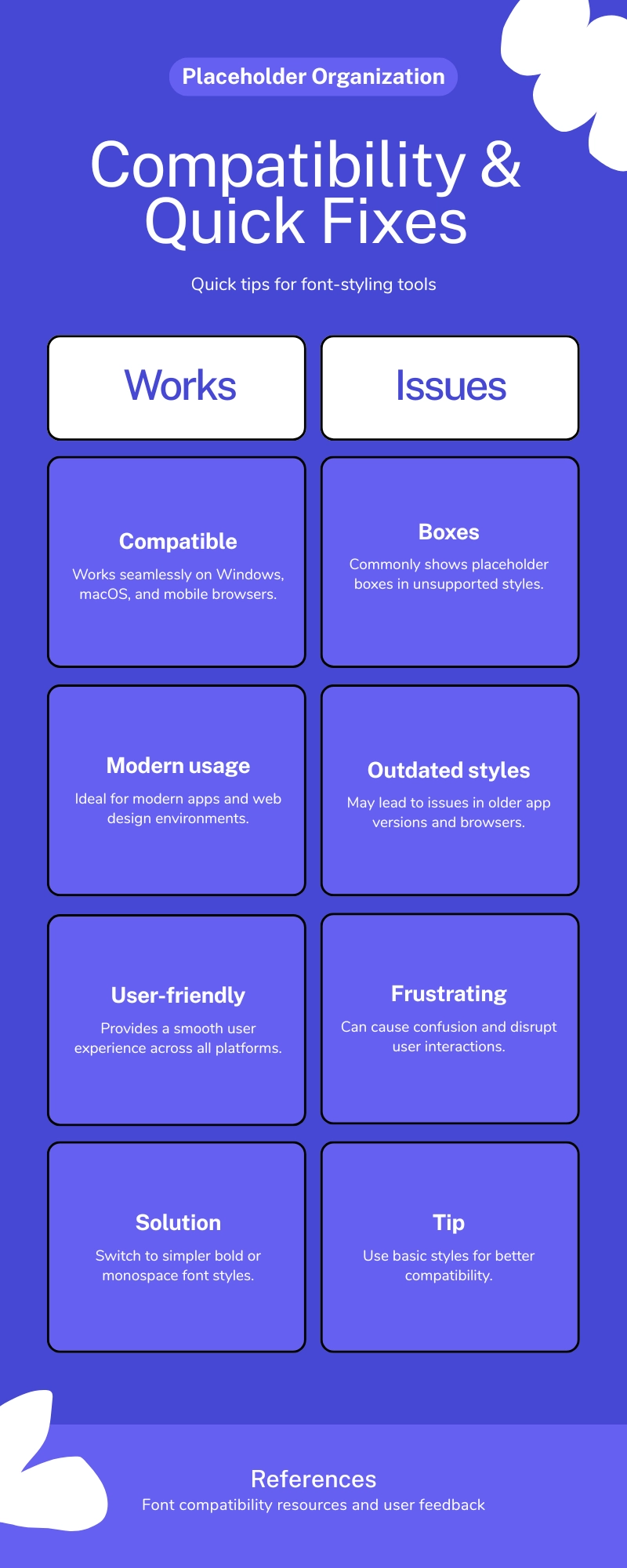
Compatibility is worth a real look. On Windows, macOS, and most mobile devices, this tool avoids the usual formatting inconsistencies and software limitations people run into when they generate fancy text online.
Modern apps render the characters fine, though old devices sometimes show boxes or question marks instead of block symbols. If that happens, switch styles to one of the plainer bold sets or monospace sets, generally the safest choice since not every platform reads special characters the same way, and some get blocked outright. Switching to a simpler style usually fixes it, no matter the device or font. A few styles stay widely supported even on older devices, though platforms like X Twitter can behave unpredictably, and LinkedIn strips stylization while Facebook strips headlines in certain fields. Always do a preview after pasting.
SEO and content tips (short and simple)
A short note on SEO and content: styled words draw the eye in social posts and thumbnails, but the main article should stay in standard text so search engines can read it properly. Keep a balance between clarity and flair on websites, and use styling sparingly.
There is an accessibility angle too, since screen readers treat each different character as something new, so content built only from styled Unicode may never be discovered or read aloud correctly. Save the visual flair for headlines, not body copy.
Common fancy-text mistakes
A common mistake is putting styled text in a username field, since most keyboards cannot type it back to log in. Unicode-styled text is also not always machine-readable, so it does not belong in invoice fields, tax forms, or payment descriptions, where script parsing expects a clean single line of plain characters that will not collide or collapse extras.
Troubleshooting quick fixes
If text shows up as squares, try switching between bold styles and sans styles until something renders. If a name rejected message appears, that usually means the platform blocks characters from that set, so drop to a simpler set. Spacing issues can often be fixed by adding spaces manually, and if copy fails completely, just copy the output again using a widely supported style.
Frequently Asked Questions
What Is a Fancy Text Generator?
A fancy font generator turns plain text into decorative designs with dozens of style options, from cursive to bold, all built for compatibility across content creation tools. It works by mapping normal letters to matching Unicode characters right inside an online tool, so no real design skills are needed for casual personal use. It stays accessible and quick, built simply to enhance messages.
Why use a fancy text generator?
Words stand out more when they carry a bit of style, in a bio, a caption, a name, or a status. It is quick, needs no design skill, and works through simple copy and paste in a matter of seconds.
Is this the same as a font?
Not exactly. A real font is a graphic font file installed on a device, but this text works differently, it swaps letters for special Unicode characters that already look like a different font. Because these are real Unicode characters, the styled letters carry their own identity.
Can I use fancy text in emails?
Fancy text can work in emails too, though not every one of the many email clients offer full support, so it is worth sending a test email first.
Is this stylish fonts generator website have any use on social media platform?
Yes, this fits social platforms well. Mixing in fancy emojis and decorative symbols alongside creative lettering builds a stronger aesthetic presentation, adding a bit of humor or sophistication depending on the tone.
Can I use this Text Generator on an online gaming platform? PUBG and Free Fire
Yes, a fancy word generator works well across gaming platforms including PUBG and Free Fire, useful for clan tags and in-game messages that need to look visually striking, helping build a distinct gaming persona or shared team identity.
Do I need to install fonts or software?
No need to install fonts or any software at all. This fancy text converter runs fully online, with no downloads required.
Is the fancy text generator free?
Yes, it is completely free, one of many tools here with no install needed.
Can I make a long paragraph in fancy text?
Long paragraphs in fancy text get hard to read fast, so it helps to break them into short parts, saving the styling for hooks instead.
Can I use fancy text in code or filenames?
Using it inside code or filenames is possible since Unicode identifiers are legal in many languages, but it invites trouble, since identical characters can look the same yet trigger bugs that are nearly impossible to find. Stick to plain ASCII for anything technical.
Why does my bio sometimes truncate when I paste fancy text?
Bios can truncate early because a single fancy character often takes up multiple bytes, or several code units, compared to a plain letter. A 150-character limit measured in those units, not plain screen length, means styled text can reach the limit faster than expected.
Is it safe to use?
It is generally safe to use. This fancy text maker online does not store user input or any personal data; it does not require an account. The main risks come from confusing characters used to impersonate brands or break platform rules, so avoid using styled text to spread harmful text.